

📝 Blog Summary
WebRTC can be a deceptive protocol. It tricks you into thinking video engineering is easy because a 1-on-1 peer connection works flawlessly in a local lab. But the moment you try to push thousands of concurrent streams through a production environment, browsers freeze, audio desyncs, and servers melt.
Scaling WebRTC systems requires abandoning the peer-to-peer illusion and building a heavy-duty, stateful media routing infrastructure.
Let’s set the record straight about WebRTC: It can behave like a trap for new engineers.
You copy a tutorial, set up a basic WebSocket signaling server, and successfully connect two browsers. It feels like magic. Then the marketing team launches the app, 50 people join a single video room, and suddenly everyone’s CPU fans sound like jet engines before their browser tabs crash entirely.
This happens because out-of-the-box WebRTC is Peer-to-Peer (P2P). In a 50-person P2P room, every single user is uploading 49 separate video streams and downloading 49 video streams simultaneously. It is a mathematical guarantee of failure.
If you want to understand how to scale WebRTC architecture to 10,000+ concurrent users, you have to stop thinking about connecting browsers to each other and start thinking about connecting browsers to a massive, centralized media routing backbone.
Here is what a production-grade, advanced WebRTC architecture actually looks like.
Why Topology is Everything in WebRTC Scale
Before you deploy a single server, you have to pick your routing topology. There are three ways to move media in WebRTC, and only one of them survives at scale.
Conclusion?
To achieve true WebRTC scale, an SFU-based architecture is completely non-negotiable.
The Non-Negotiable Components to Scale WebRTC Architecture
A production environment handling 10k+ users isn’t just a heavy media server. It is a distributed microservices environment. If you are missing any of these four layers, sadly, your system will eventually collapse.
1. The Signaling Layer
WebRTC doesn’t dictate how you establish a call; it leaves signaling up to you. At scale, a single Node.js WebSocket server won’t cut it. You need a clustered signaling tier.
When User A connects to Signaling Node 1, and User B connects to Signaling Node 2, those nodes must communicate via a high-speed pub/sub message broker (like Redis or NATS) to exchange the crucial SDP (Session Description Protocol) offers and ICE (Interactive Connectivity Establishment) candidates.
2. The Media Edge
In the real world, enterprise firewalls and symmetric NATs block UDP media traffic. Some of your users will absolutely require a TURN server to relay their media over TCP port 443 to bypass firewalls. If you don’t deploy a geographically distributed cluster of TURN servers (like coturn), a chunk of your user base simply won’t have video.
3. The SFU Fleet
This is where the heavy lifting happens. Media servers like Janus, Mediasoup, or Pion sit here. They don’t decode the video; they inspect the RTP headers and route the packets.
4. Global State Management
If you have 50 media servers, how does the system know which server is hosting Room #402? You need a central state repository (usually Redis) that tracks exactly which users and which rooms are assigned to which specific SFU node in real-time.
Horizontal WebRTC Scaling Without Dropping Calls
The hardest engineering challenge in WebRTC is horizontal scaling. What happens when a single video room exceeds the capacity of a single SFU server? (For example, an all-hands meeting with 2,000 viewers).
You cannot simply put an AWS Application Load Balancer in front of your media servers and call it a day. WebRTC media relies on stateful UDP connections. If a load balancer randomly shifts a user’s RTP packets to a different server mid-call, the stream dies instantly.
The Solution: SFU Cascading
To scale massive rooms, you have to cascade your media servers.
- The Origin Node: The presenter publishes their camera feed to a single Origin SFU.
- The Edge Nodes: You spin up 10 additional “Edge” SFUs.
- The Cascade: The Origin SFU forwards the presenter’s single stream to the 10 Edge SFUs.
- The Subscribers: The 2,000 viewers connect to the Edge SFUs to consume the media.
This architecture allows you to scale a single broadcast to millions of users globally without blowing out the network interface card (NIC) on your origin server.
💡 Expert Tip
Stop rewriting your app from scratch to scale it.
If you have a monolith WebRTC app that is falling over, do not rip out the media engine. Introduce a smart Director Service API at the front door.
Before a client connects to a WebSocket, it hits the Director via HTTP. The Director checks Redis for server load, spins up a new SFU instance via Docker/Kubernetes if needed, and hands the client a specific server IP.
You just bought yourself infinite horizontal scale without touching a single line of your core WebRTC code.
The AI Bottleneck in WebRTC Architecture
Everybody wants live transcription or conversational AI agents in their video rooms. But if you try to run heavy machine learning models on the exact same SFU servers that are routing your media packets, your infrastructure will burn to the ground.
At scale, heavy media processing requires strict isolation:
- Client-Side Compute: Do not waste expensive server CPU on tasks the user’s laptop can handle. Features like background blur or AI noise suppression should be executed locally using WebAssembly (WASM) before the video even hits the WebRTC peer connection.
- The “Silent Subscriber”: For massive tasks like real-time meeting transcription, do not hack your SFU to decode media. Instead, build a separate AI Media Gateway cluster. It connects to your SFU (just like a normal, invisible user), subscribing to streams, decoding the media safely off-site, and piping the raw audio to your LLMs.
💡 Expert Tip on AI Syncing
When you pipe WebRTC audio out to a cloud AI engine for live transcription, the text response will return with a slight delay. If you don’t map the AI’s response back to the original WebRTC RTP timestamps, your closed captions will be completely out of sync with the speaker’s lip movements.
So, always pass the RTP timestamp metadata along with your AI API payload!
Catching Quality Drops in WebRTC Systems Before the Crash
Want to know a painful operational reality? WebRTC infrastructure degrades silently.
If a web server is failing, the CPU spikes to 100%, and it throws 502 errors. WebRTC is different.
Because it relies heavily on UDP traffic, the server will happily keep routing packets even if the network pipe is choked. Long before your SFU CPU hits maximum capacity, the network interfaces will experience micro-bursts of packet loss.
To the server, everything looks green. To the end-user, the audio sounds like a robot, and the video is frozen.
The Observability Gap in WebRTC Scale
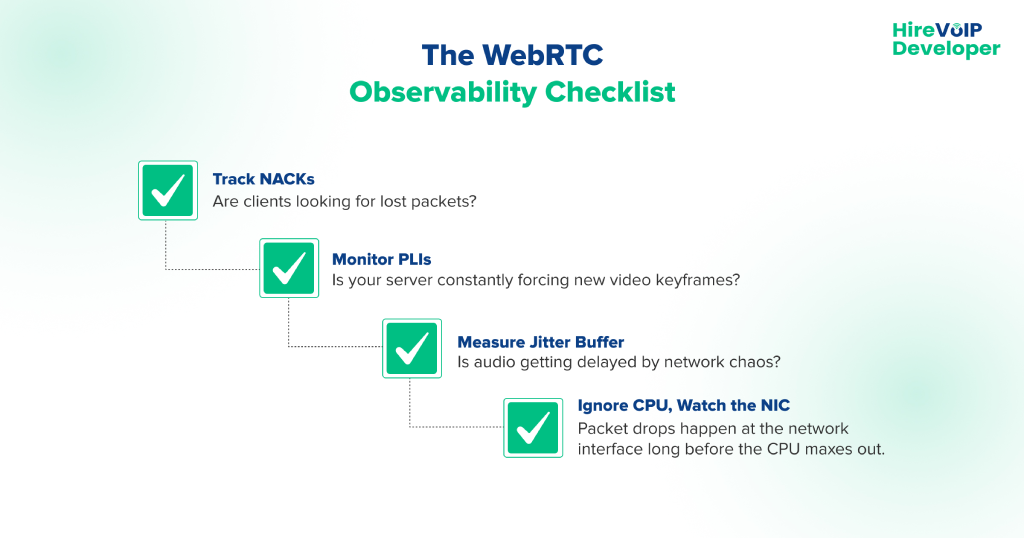
You cannot monitor scaling a WebRTC architecture using standard IT metrics. You must ingest raw WebRTC telemetry from the client side (getStats() API) and correlate it with the server.
You need to set alerts for these specific metrics:
- NACKs (Negative Acknowledgments): When clients constantly ask the server to resend lost video packets, your network is congested.
- Jitter: High variance in packet arrival times will destroy real-time audio.
- PLI (Picture Loss Indication) Requests: If your server is flooded with PLIs, the SFU is struggling to keep the video keyframes synced.
How EdTech, Telemedicine, and Fintech Scale WebRTC Differently
WebRTC is not one-size-fits-all. Different industries demand entirely different architectural priorities.
EdTech: The Asymmetrical Routing Challenge
A massive online classroom has 1 teacher publishing and 1,000 students passively watching. The architecture must prioritize SFU cascading and aggressively utilize Simulcast. The teacher sends three different resolutions (High, Med, Low) to the SFU.
The SFU then dynamically routes the Low-res stream to a student on a bad mobile connection, while routing the High-res stream to students on gigabit fiber.
Telemedicine: Strict Compliance and Security
HIPAA compliance demands extreme security. Standard WebRTC encrypts media hop-by-hop (Client → SFU → Client), meaning the SFU technically has access to the raw media keys.
In telemedicine, architects are increasingly forced to implement WebRTC Insertable Streams for true End-to-End Encryption (E2EE), ensuring that even a compromised SFU server cannot decrypt the patient’s video.
Also read How to Detect and Prevent WebRTC Leak Test?
Fintech: Navigating Hostile Networks
Banks and financial institutions have the most hostile corporate firewalls on earth. They block UDP traffic by default. Fintech WebRTC platforms must massively over-provision their TURN infrastructure, forcing almost all media to be relayed over TCP port 443 so it looks indistinguishable from standard HTTPS web traffic to the corporate firewall.
Building a WebRTC platform that handles 10,000+ users isn’t just about tweaking your JavaScript. It requires a fundamental shift into distributed systems engineering, rigorous media routing, and deep network observability.
Stop relying on local lab tests, and start architecting for the chaos of the public internet.Ready to refactor your media architecture for extreme scale? Consult our WebRTC experts today!